Curriculum · Building skills
Building skills you keep
Turning a job you repeat into a skill: a short set of instructions your AI assistant follows, built from blocks and exported as a real SKILL.md file.
What you practice
Practice building skills you keep.
Every lesson puts one of these in front of you, set in ordinary work, and shows right away why your call was right or wrong.
What changes: Turn a job you repeat into a skill your assistant runs for you.
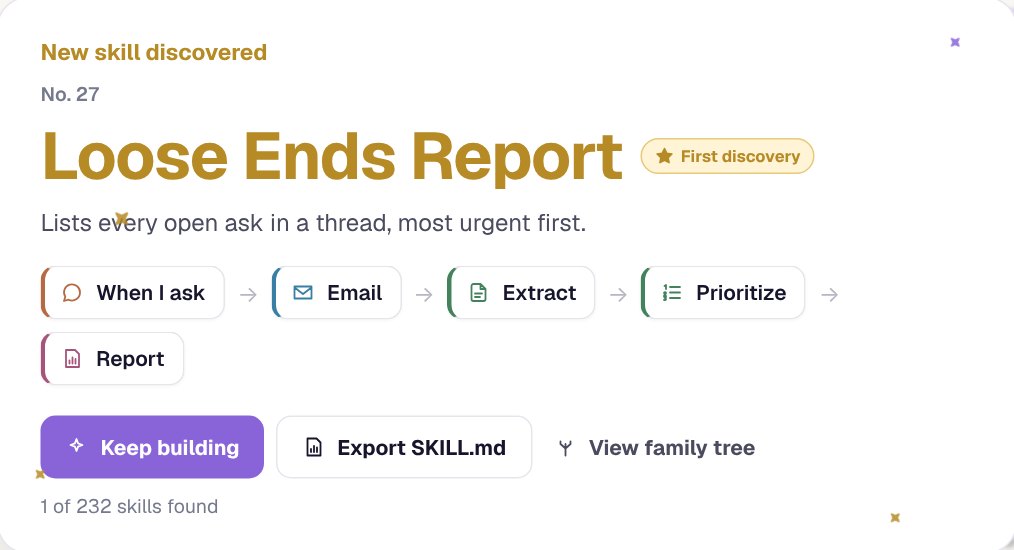
- Put blocks in a line to describe a job: what starts it, what it works from, what it does and what it hands back.
- Answer a coworker’s request with a skill that does what they asked, and see how they react.
- Decide whether a job is worth a skill at all, and what done looks like for it.
- Find which block broke when a skill’s result changes, and fix it so it still works next time.
- Take a skill into your own AI assistant and build it there.
What it looks like
From blocks to a skill.

See a real exported file on the For individuals page.
Why it matters
Why building reusable skills matters at work.
A skill turns a job you explain again every week into one you just ask for. Written well, it says when to use it, the steps to follow and what to hand back, so your assistant does the job the same way each time you ask.
Building one is also the best test of everything else in the course: a skill only works if the job was right for AI, the brief is clear, the context is named and the result is checked.
Where it sits in the course
Open from the start, with new blocks added as you finish other lessons. Every act ends with a capstone in your own AI assistant, in the first, you build a skill you made there, and in the second, you run one on your real work.
The course is one path in eight parts, called acts. See the whole path
Keep going
Read and practice next
Guide
What is a Claude skill (SKILL.md), and how do I make one?
What a SKILL.md file is, what goes in one, and how to turn a job you repeat into a skill.
Guide
How do I train employees to use Claude?
Practice the calls around Claude on each role’s work, then turn repeated jobs into skills Claude can use.
Previous habit
Checking AI output
Check a draft against what you know, catch what doesn’t hold up, and know when it’s ready to send.
Questions
What changes at work when you practice this?
Turn a job you repeat into a skill your assistant runs for you.
What is a SKILL.md file?
A plain text file of instructions an AI assistant can follow: a name, a description of when to use it, and the steps. Claude can use one as a skill, and any assistant can follow its instructions.
Do I need to code?
You don’t need to code. You build a skill from blocks, and Skill Tree writes the file.